
The text came through at 6:52: “did you get home?” Four words, sent to a kid who was, presumably, already home for eleven minutes and hadn’t looked at their phone. If you’ve sent that text (or been the parent who finally stopped and wondered why you’re the one doing the tracking work), you already understand the problem HeyPolo is trying to solve. It’s a consent-based family safety and location-sharing app for iPhone and Android, built by the team behind Surfshark, the VPN company, which matters when an app is holding your kid’s location and has no long track record of its own.
What follows is the honest version: how the sharing actually works, what it costs (the published prices genuinely disagree. I’ll show you), where the privacy claims hold up and where they wobble, how it compares to Life360 and Find My.
Key Takeaways
HeyPolo is a consent-based family location-sharing app from the team behind Surfshark, with Exact, General, and Private modes plus an auto-stop sharing timer that switches itself off.
Pricing is genuinely unclear across sources: $5.99/month or $1.99/month billed yearly (Cybernews review), $3.59/month (Cybernews verdict), $3.99/month (GadInsider), one subscription covers unlimited family members, and there’s no free tier.
The biggest honest caveat: each family member must open the app roughly daily or location updates stall, which one App Store reviewer called a deal breaker.
Table of Contents
What HeyPolo is and who builds it
HeyPolo is a family safety and location-sharing app that runs on both iPhone and Android, so a mixed-device household all sees the same thing in one group. The seller is HeyPolo Inc, the app requires iOS 17.0 or later, and the most recent noted update (version 1.48.0) added trip playback. It holds a 4.9-star rating on both app stores, which is a decent early signal for a young app, not proof of a long one. What you won’t find here is message monitoring, screen time controls, or content blocking, and that’s deliberate. It’s built by the team behind Surfshark, a security company trusted by more than 4 million people, the reassurance being that whoever holds your family’s location data should be someone with a track record of holding data responsibly.
How HeyPolo’s consent-based location sharing works
Sharing runs on a timer you set, with three precision modes (Exact, General, and Private), Shared Places check-ins, and scheduled sharing you can set to repeat. That combination is the whole pitch: every member decides when they’re visible, how precisely, and for how long.
The timer does the remembering
Sharing is a deliberate act, and when the timer expires, broadcasting stops on its own. You can set repeating schedules (school days, say), a one-time share (the walk home from practice), or 24/7 if everyone genuinely agrees. Nobody has to remember to turn it off, because nobody remembers to turn it off.
The three modes you’d actually toggle
Exact shows precise location, you can see exactly where they are. General shows a neighborhood radius, close enough that you know they’re in the area, not which house. Private hides exact location while they stay connected to the group. The vignette the app is clearly built around: a teen flips to Exact walking home at night, drops to General when they’re out with friends, and sits in Private the rest of the time. They’re still in the group; they just get to have a life.
Check-ins without the breadcrumb trail
Shared Places alerts the group when someone arrives at home, school, work, or anywhere else that matters, and it hides location during the trip, revealing it only on arrival. You get the “made it” without watching the route. Arrival and departure alerts mean you stop refreshing the map, and the developer has confirmed more than 4 place alerts per person. Trip history covers only the last 7 days, and only with consent.
Emergency features that work when sharing is off
The emergency toolkit exists so that turning sharing off doesn’t mean being unreachable. One tap on SOS sends precise coordinates to chosen contacts, because in a real moment nobody navigates menus. Emergency Call-Through overrides silent mode and Do Not Disturb and rings a chosen person’s phone loudly, the “why aren’t you answering” problem, and every parent knows that specific silence. Even with sharing off, an emergency grants one-time live location access with the user’s permission.
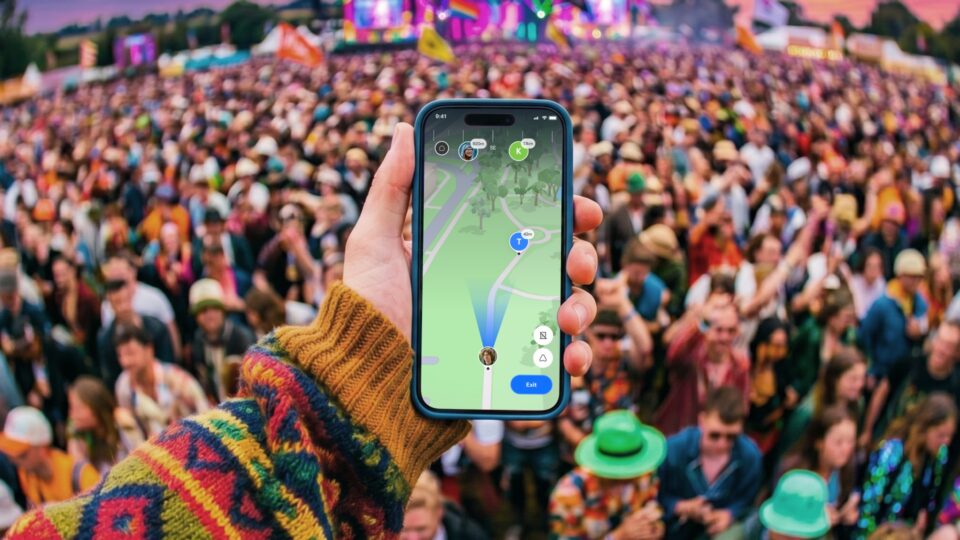
It’s permission, not a sneak peek. The rest of the kit rounds things out: low battery alerts around 20% (you learn the phone is dying without seeing the level all day), dangerous weather alerts, and a Live Compass for finding each other in crowds.
Driving safety features: what’s live vs still rolling out
If you have a teen or new driver, this is the part that would sell you, so here’s the straight version: it’s promising, but the headline driving features are still rolling out. The Driving Safety Score is meant to measure speeding, phone use, harsh braking, rapid acceleration, and harsh cornering, the marketing sample shows a driver with 13 drives, 52.5 miles, and a 9.4 score. Crash detection is meant to alert the family on serious collisions. Speed monitoring, once it’s live, gives you visibility into whether your kid is actually keeping within the speed limit. But the roadmap targets July 2026 for these, and at least one reviewer confirms drive scoring wasn’t active for them yet, so treat it as a staged rollout arriving gradually, not something you can count on the day you subscribe.
The features are supposed to be added automatically to existing plans. The deal, in plain terms: you get driving insight, and your kid knows you get it.
How much HeyPolo costs, and why the published prices disagree
Somewhere between $1.99 and $5.99 a month, depending on who you believe. The Cybernews review lists $5.99/month, or $1.99/month billed yearly; the Cybernews verdict puts it at $3.59/month; a GadInsider video says $3.99/month. I’m not going to pretend one of those is authoritative, because the sources don’t support that, check heypolo.com for current pricing before you subscribe. What every source agrees on: one subscription covers unlimited family members, only one person pays, and everyone else joins free.
Adding grandma doesn’t add a line item. There’s a 30-day money-back guarantee on all plans, billing is annual, VAT may apply, and it auto-renews unless you cancel. There’s no free tier, this one costs money, unlike Find My, and you’ll have to decide if that’s the price of what it does.
Is HeyPolo legit? Trust signals and the privacy-label tension
A qualified yes, legit enough to try, with conditions on both sides of the ledger. Here’s each side, because the interesting part is where they meet.
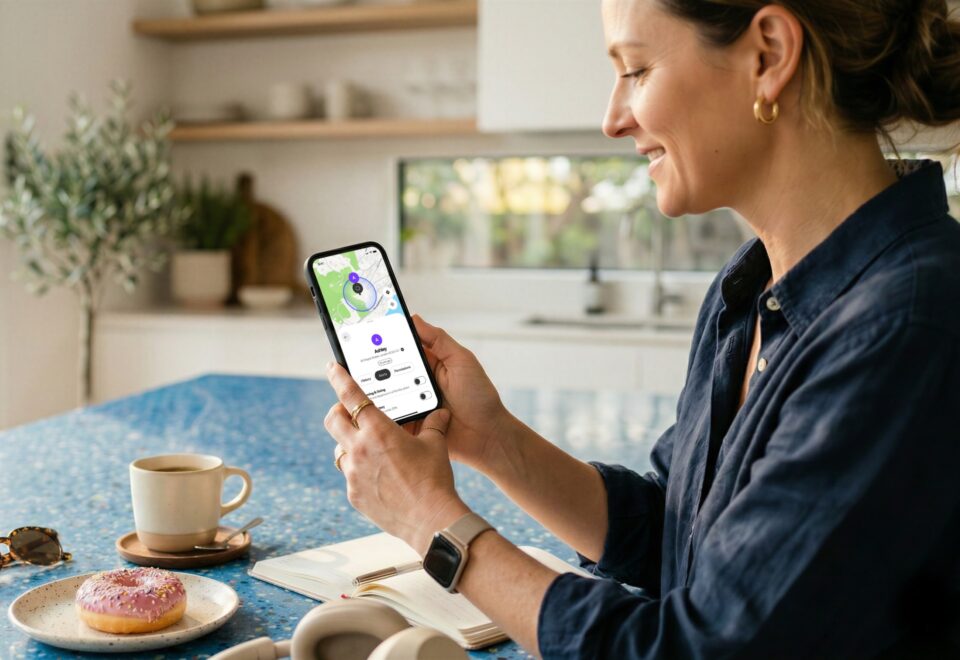
The case for trusting it
Start with who built it: the team behind Surfshark, a security company trusted by more than 4 million people worldwide. Not some two-person startup, and not an ad-tech company pivoting into your family’s location. The app holds 4.9 stars on both the App Store and Google Play, it encrypts data in transit, there are no ads, and the stated policy is that location is never sold or monetized, not to advertisers or data brokers. The 30-day guarantee means you can walk away, and the developer has a pattern of responding to reviews personally.
Independent reviewers back some of this up. Alexandra Akhmetova at Cybernews tested the app with a family for a few weeks and found it balances security and privacy, offering check-ins and emergency tools without 24/7 monitoring unless each member consents. Cybernews’s 2026 verdict ranked it first among family safety apps for both capability and privacy. (For what it’s worth, Cybernews is a reasonable source here: they publish their testing methodology, disclose affiliate commissions, and are behind reports like The Mother of All Breaches.) Their broader point is one I’d co-sign: constant surveillance isn’t just a boundary problem for kids, it’s the model that turns location into a product that gets sold to brokers.
The part that doesn’t fully line up
Now the wrinkle. The App Store’s own privacy label says Identifiers may be used to track users across other companies’ apps and websites. The same label shows Location, Contact Info, Usage Data, and Diagnostics being collected but not linked to identity, and notes the app may use location when it’s not open, which can nibble at battery. Set the two published facts next to each other and the tension is right there: the marketing says your location is never sold, while the label says identifiers can track you across other companies’ apps.
Those are different data doing different jobs, collecting tracking identifiers isn’t the same as selling location, but you don’t have to take my reconciliation. Read the label yourself and judge.
Why does this even matter? Because in December 2021, The Markup reported that Life360 sold precise location data on tens of millions of users. That’s the wound this whole category is healing from, and it’s why “we never sell location” is a claim worth checking against the fine print rather than taking at face value.
HeyPolo vs Life360: alert economics, not feature counts
The decisive difference isn’t the feature list, it’s what each app charges you for, and what one of them got caught doing. In December 2021, The Markup reported Life360 sold precise location data on tens of millions of users, which is why a chunk of families started shopping at all.
On the money side, the comparison gets almost absurd. Life360 starts at $6.66/month, and unlimited location alerts cost $150/year, while lower tiers get only 2 alerts total. HeyPolo includes unlimited place alerts in the single subscription, the developer has confirmed more than 4 per person, and only one member pays, according to this honest HeyPolo review. On the privacy side, Life360 has no auto-off sharing timer and no adjustable precision: once you’re on the map, you’re on the map.
HeyPolo’s three modes and expiring timers are the entire counter-argument. And if you’re buying it for the driving reports, note that Life360 erroneously flags a passenger’s phone use as dangerous driving, which is the kind of false alarm that erodes trust in the whole report.
| HeyPolo | Life360 | |
|---|---|---|
| Place alerts | Yes (unlimited included, 4+ per person confirmed) | Partial (2 total on lower tiers; $150/year for unlimited) |
| Precision control | Yes (Exact, General, Private) | No |
| Auto-off sharing timer | Yes | No |
| Location selling record | No (never-sell policy; see App Store label caveat above) | Yes (The Markup, December 2021) |
| One payer, unlimited members | Yes | No |
Before comparing features, it’s worth grounding any tracking setup in consensual location sharing, an ethics-first approach that keeps adult location sharing honest and legal.
One documented switching story is worth reading in full. An App Store reviewer named Magkpr wrote that their family left Life360 over its privacy record, praised HeyPolo’s unlimited alerts and lack of ads, and still called the daily app-open requirement a deal breaker. More on that below, because it’s the complaint marketing never mentions. If you want the fuller head-to-head, the HeyPolo vs Life360 comparison covers it.
HeyPolo vs Apple Find My for mixed-device families
Find My is free, and it’s iOS-only, which means it structurally can’t serve a household with an iPhone parent and an Android kid. Even in an all-Apple family, its sharing is built mainly for finding lost devices, its time-limited sharing caps at 1 hour or end of day, and it has no safe-place alerts and no driving reports. HeyPolo runs everyone in one cross-platform group with identical features on both phones. So the honest trade is this: if you’re all on Apple and “did everyone get home” isn’t a daily question, the free default is enough. If your family is mixed-device or you want arrival alerts that actually fire, Find My can’t do the job, and the subscription is the cost of that.
What real users say, praise, complaints, and developer responses
Ratings are high and the developer responds personally, but the most common complaint is a reliability one no marketing page mentions. 4.9 stars on both stores, and Cybernews’s hands-on testing over a few weeks concluded it may be the first non-intrusive family safety app. Magkpr’s family switched from Life360 over its privacy record and praised the unlimited location alerts, no ads, no drive scoring, responsive developers. Then the complaint: Magkpr found that location updates stall unless each member opens the app roughly daily, even with the recommended settings, and called it a deal breaker. The tell is a stale “last updated” timestamp, and the consequence is missed arrival alerts, the exact opposite of why families subscribe.
It reads as a pattern in App Store reviews, not one household’s bad luck, and it’s the real catch: the app only works if everyone actually uses it. The blue iOS location indicator bothered some young family members too, because it felt invasive and because the constant visual noise could mask genuinely malicious tracking. Users have requested things like removing the Dynamic Island indicator (Aydenhennessey) and an Android-style Exceptions feature, which sp3197 called “a killer feature”, the developer agreed to forward that request and says it’s working on reducing the indicator. One practical gap: there’s no documented phone number. Support is email only, at support@heypolo.com and max@heypolo.com.
Who HeyPolo is for, and who should skip it
If what you’re actually asking is whether you can quietly track someone, the answer is no, and it’s architectural: every member controls what, when, and with what precision they share, so covert tracking isn’t something HeyPolo can do. Depending on why you asked, that’s either the dealbreaker or the selling point.

Who it fits
Anyone in a “did you get there OK” group: parents of teenagers, parents of young kids, adult children keeping an eye on a parent who lives alone, couples, multigenerational families, and groups that aren’t strictly family, friends and workmates count too. Picture the alert feed doing its thing: Arrived Home, Needs help now, On the move at 47 MPH, Left Ballet. The use cases are the ordinary ones, a teen walking home, a partner driving back late, a taxi ride home, finding each other at a concert. The marketing testimonials (Casey, Sophie, Rob, and the rest) read fine as social proof, but the ratings and the reviewer accounts are the better evidence. There’s a deeper walkthrough in the HeyPolo app guide if you want to see the interface before deciding.
Who should skip it
If you want 24/7 tracking, message or screen-time monitoring, or content blocking, this isn’t your app, and that’s by design, not a flaw or a missing feature. Plenty of parents want more visibility than HeyPolo offers, and that’s a legitimate call. If parental controls are the real need, that’s a different category entirely: Aura covers internet safety and screen time in one place, Qustodio keeps controls simple with detailed reports, and Bark protects all the Wi-Fi-connected devices in the house.
Setting up HeyPolo and the first-week reality
Setup is three steps and genuinely minutes: download HeyPolo on iPhone or Android, create the family group, and send free invitations to everyone else, since only one person pays. When you launch the app, you’ll pick a sign-up method, email, Google, or Apple, and if you go the email route, you’ll need a verification code from your inbox before you’re in. The real onboarding isn’t technical, though. It’s the conversation about who shares what and at what precision, and a recurring first-week pattern in early reviews suggests you’ll have it sooner than planned: family members notice the persistent blue iPhone location indicator, feel monitored, and suddenly everyone’s negotiating the modes. Better to walk in expecting that conversation than pretend the app installs itself into trust. The fine print lives at heypolo.com/privacy-policy and heypolo.com/terms-of-service if you want it before the group chat does.
The 2026 verdict: best privacy-conscious option, bought partly on a roadmap
Here’s the thing, though. The consent model is the actual product, not a hedge, and it’s also the biggest limit on an app that’s otherwise the strongest privacy-conscious family location app available right now. You’re partly subscribing to a roadmap rather than finished features. The roadmap targeted by July 2026, accident detection with auto-alerts, weekly driving reports for coaching teen drivers, and smart warnings for environmental hazards like tornadoes, intense heat, and freezing conditions, is a set of dates that has now passed on the calendar, but the sources only support those as targets, and reviewers report the driving features haven’t reached everyone yet. Weigh that against the real weaknesses: consent-based sharing means peace of mind depends on everyone actually keeping the app open daily, the published prices conflict, and there’s no free tier.
Frequently Asked Questions
What is HeyPolo?
HeyPolo is a consent-based family safety and location-sharing app for iPhone and Android, built by the team behind Surfshark, the VPN company trusted by more than 4 million people. Every family member decides when they’re visible, how precisely, and for how long. It deliberately skips message monitoring, screen time controls, and content blocking.
Can I track my husband’s phone location?
Not quietly, and that’s by design. HeyPolo is consent-based: every member controls what, when, and with what precision they share, so covert tracking isn’t something the app can do. If your husband agrees to share, you’ll get arrival and departure alerts and live location; if he doesn’t, there’s no workaround.