
Ever freeze right in the middle of a sentence during a Zoom call? It happens to the best of us. My home network used to drive me up the wall with constant buffering, especially when the kids were streaming upstairs while I tried to work downstairs. After researching every internet option out there and testing the hardware myself, I found that Xfinity by Comcast’s xFi Complete was the fix I needed, combining advanced security and whole-home Wi-Fi coverage into one simple plan.
So, grab a cup of coffee, and let’s go through it together. I’ll show you exactly how this bundle works and whether it’s still the right move for your home in late 2025.
Key Takeaways
The Bundle Value: XFi Complete combines an xFi Gateway (modem + router), unlimited data (saving you from the 1.2 TB cap), and advanced security for about $25/month—cheaper than buying them separately.
Smart Hardware: It includes the XB8 Gateway (and newer XB10 in some areas) which supports Wi-Fi 6E, handling over 100 devices at once without slowing down.
Security That Travels: You get Advanced Security on the go, which blocks malware and phishing attempts on your mobile devices even when you’re using public Wi-Fi at a coffee shop.
The 2025 Shift: As of June 26th, 2025, new sign-ups are limited to select markets. If you already have it, you keep your benefits, but you must now manually request hardware upgrades rather than getting them automatically.
New Plan Standards: Many upgraded internet plans launched in mid-2025 now include unlimited data and equipment as standard features, making the separate xFi Complete add-on less necessary for new customers.
Table of Contents
What Is XFi Complete?
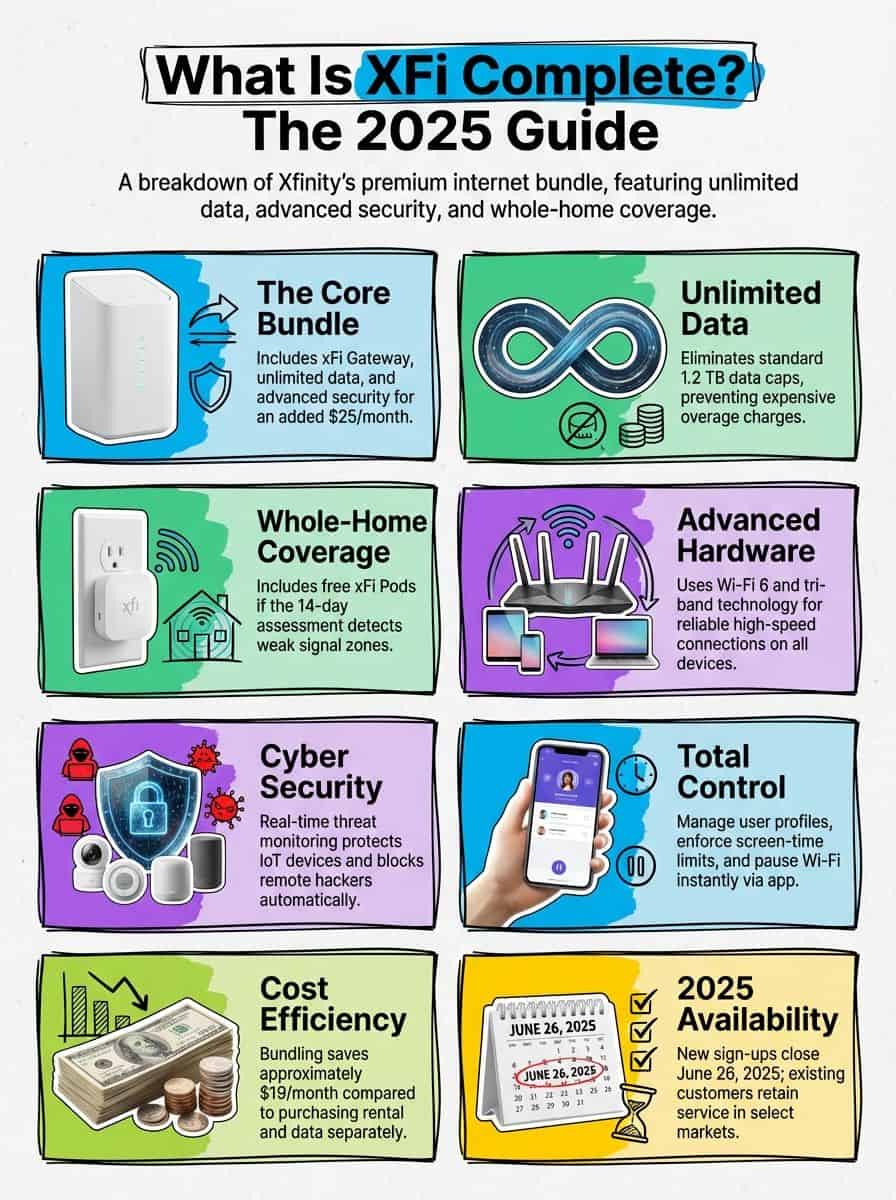
After seeing how fast our digital needs change, I realized many of us just want Wi-Fi that works without a fuss. xFi Complete is Xfinity’s premium bundle designed for households that need serious performance, advanced threat monitoring, and unlimited data without watching the meter.
For $25 a month added to my internet bill, this plan covers my entire home. It is a lifesaver for busy houses like mine, filled with tablets, smart thermostats, and multiple people streaming 4K video or running conference calls at the same time.
The subscription includes an xFi Gateway—a powerful 2-in-1 modem and router. This device uses Wi-Fi 6 technology (and Wi-Fi 6E on the XB8 model) to deliver reliable high-speed connections to smartphones, laptops, and smart home gadgets.
I control everything through the xFi app on my phone. I can pause Wi-Fi during dinner or set “downtime” schedules so the kids aren’t online when they should be sleeping. Plus, the real-time security stops hackers from accessing my smart cameras or stealing passwords.
Just a heads-up: As of June 26th, 2025, Xfinity paused new sign-ups for this specific add-on in many regions. If you are already signed up, you are safe, but new customers might see these features bundled into the main internet plans instead.
“I love knowing that every gadget—from gaming routers to Bluetooth speakers—is covered without worrying about data caps.”
Key Features of XFi Complete
XFi Complete packs a big punch with better wireless coverage, safety tools that actually work, and the hardware to back it up. It gives me peace of mind so I can work from the kitchen or stream music on the patio without missing a beat.
How Does Whole-Home WiFi Coverage Work?
The promise of “Wall-to-Wall” coverage is a big selling point. Once I activated my new Gateway, the system ran a Whole Home WiFi evaluation over the first 14 days. It analyzed my usage patterns and signal strength to see if my connection dropped in the back bedrooms.
If the system finds dead spots or weak signals, Xfinity sends you xFi Pods for free (included in the xFi Complete plan). These are mesh WiFi extenders that plug into a wall outlet and boost the signal to hard-to-reach areas, like a basement office or an upstairs guest room.
Placement is key. I put my Gateway in a central, open spot to spread reliable dual-band Wi-Fi evenly. For larger homes, those Pods are essential—they hand off the signal smoothly so you don’t disconnect while walking from room to room.
With Wi-Fi 6 tech and the Pods working together, video calls stay clear even if someone else is downloading a huge file. And if the power goes out, knowing [how to survive without internet](https://www.tidbitsofexperience.com/how-to-survive-without-internet/) is a good backup skill to have.
What Advanced Security Features Are Included?
Security is where this plan really shines for me. XFi Complete includes real-time threat monitoring that shields every single device connected to my network. It automatically blocks remote hackers from trying to access vulnerable smart devices, like baby monitors or smart bulbs.
Using the Xfinity mobile app, I get alerts if a device acts suspiciously—like if a smart speaker suddenly tries to connect to a known malicious server. I can also set clear profiles for my kids, filtering out adult content and pausing their access with one tap.
One of my favorite perks is Advanced Security on the go. When I enable this in the app, my phone gets the same protection even when I’m using public Wi-Fi at a library or airport. It creates a secure VPN-like tunnel to keep my data safe from snoops.
If something suspicious creeps into our wi-fi networks, the system blocks it and tells me instantly. If it blocks a site I know is safe, I can unblock it manually right in the app.
Just remember, if you switch plans or drop xFi Complete, these extra layers of protection turn off immediately.
Is There an Unlimited Data Option?
Yes, and for many families, this is the main reason to buy the bundle. Standard Xfinity plans in many areas come with a 1.2 TB data cap. That sounds like a lot, but between Zoom calls, 4K Netflix streaming (which uses about 7GB per hour), and game downloads, it goes fast.
If you cross that 1.2 TB line, Xfinity charges $10 for every extra 50 GB block, up to a maximum of $100 in overage fees per month. That can double your bill in a flash.
With xFi Complete, unlimited data is included. The standalone price for unlimited data is usually $30/month, but since xFi Complete costs about $25 total (including the modem rental), you actually save money by bundling. It’s a no-brainer if you use a lot of data.
For a freelancer like me, it means no surprise charge at the end of the month. I can download large project files or let the kids binge a new series without constantly checking the usage meter.
What Are the Benefits of Wi-Fi 6 Technology?
Wi-Fi 6 (and the newer 6E) is built for modern homes with dozens of devices. The xFi Gateway uses this tech to talk to multiple devices at once, rather than making them wait in line. This reduces “latency” or lag, which is critical for gaming or video conferencing.
The newer XB8 Gateway supports the 6 GHz band, which is like a wide-open express lane for newer devices, completely separate from the crowded signals of your neighbors. This helps eliminate dead zones and keeps speeds high even during peak hours.
My connection feels snappy whether I’m on my laptop, phone, or streaming to the TV. The Gateway automatically uses better bandwidth allocation protocols to ensure the device that needs the most speed (like my work computer) gets it.
Fast Wi-Fi isn’t just about speed; it’s about everyone getting what they need—even during busy evenings when every screen seems lit up.
Wondering about the box that makes this all happen? Let’s look at the hardware.
XFi Gateway Modem and Router
The XFi Gateway is a sleek white or gray tower that replaces the need for a separate modem and router. It uses DOCSIS 3.1 technology to handle gigabit speeds efficiently. By renting it as part of the bundle, you get Xfinity’s support if anything breaks.
What Are the Technical Specifications?
I like gadgets that just work, but knowing the specs helps you understand what you’re paying for. Here is what the latest XB8 and XB7 models bring to the table:
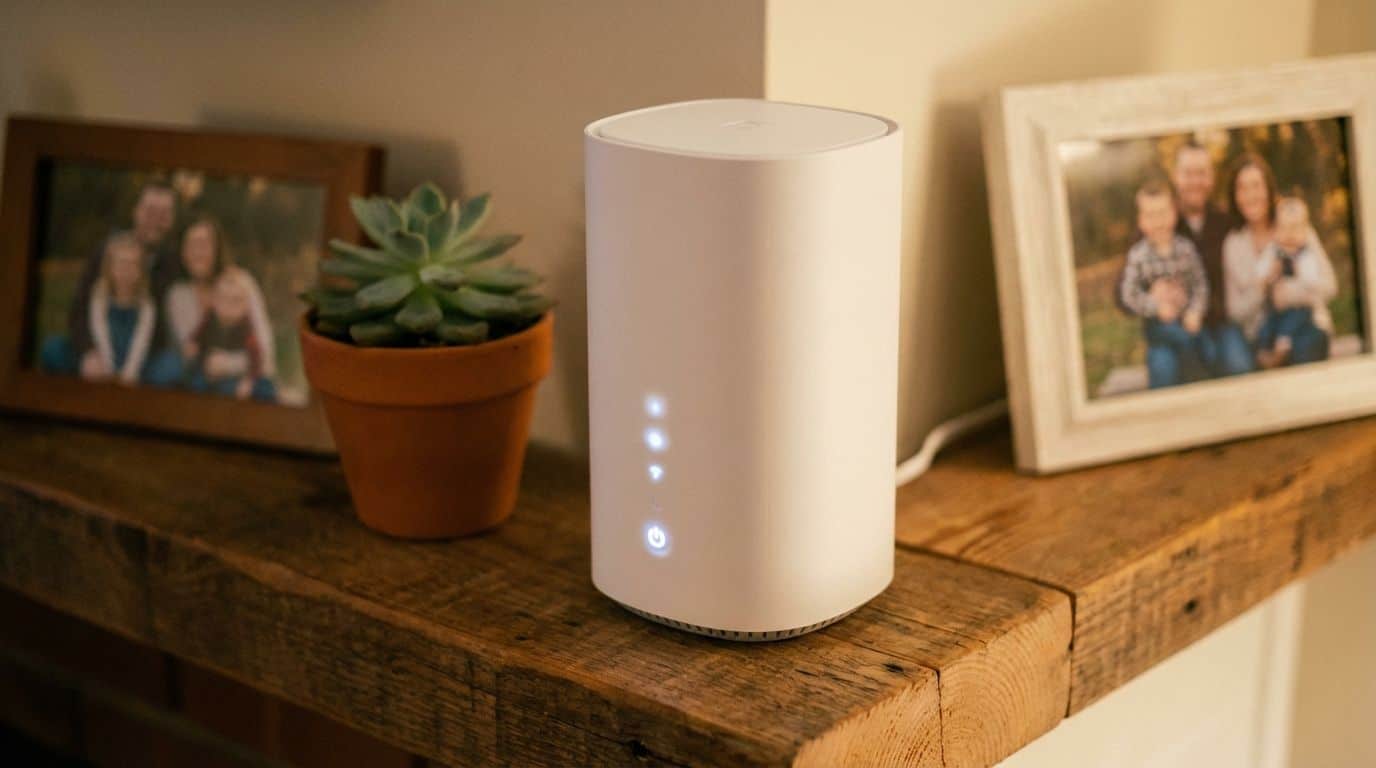
- Tri-Band Support: The XB8 uses three bands (2.4 GHz, 5 GHz, and 6 GHz). This reduces interference significantly compared to older dual-band routers.
- High Capacity: These gateways can handle up to 100 devices per band. If you have smart lights, locks, and plugs, this capacity is essential.
- Speedy Ports: It includes one Ethernet port rated for 2.5 Gbps (great for a high-end gaming PC) and three standard 1 Gbps ports.
- Future-Ready: The hardware supports Bluetooth Low Energy and Zigbee, allowing it to act as a hub for many smart home devices without needing extra bridges.
- Guest Access: You can create a secure guest network so visitors can get online without you having to reveal your main password.
- Specific Models: Look for model numbers like CGM4981COM (XB8) to ensure you have the latest gear.
These specs ensure your home office runs smoothly and your kids can game without shouting about “lag” every five minutes. Plus, the strong encryption keeps your broadband connection private.
How Does the Modem and Router Integration Work?
Setting up the xFi Gateway was surprisingly easy. I plugged the coax cable into the wall, plugged in the power, and opened the app. It took about 10 minutes to activate.
Because it’s a 2-in-1 device, I didn’t have to mess with connecting a router to a modem or troubleshooting which one was causing an issue. The Gateway handles the conversion of the cable signal into Wi-Fi automatically.
It uses a feature called “Band Steering” to automatically move your devices to the best frequency. If my phone is far away, it puts me on 2.4 GHz for range; if I’m close, it switches me to 6 GHz for speed. I don’t have to do a thing.
You can manage it all via http://10.0.0.1 if you are tech-savvy, but honestly, the Xfinity app is much easier for managing the home network database and devices.
How Do You Manage Your Network with the Xfinity xFi App?
The Xfinity xFi app is my command center. It turns a complex invisible network into something I can see and control with a few taps.
- Instant Setup: I used the wizard to name my Wi-Fi network and set a password in minutes. No complex manuals needed.
- Device Dashboard: I can see exactly what is connected, from the Smart TV to the weird “Unnamed Device” (which usually turns out to be a smart bulb).
- Downtime Schedules: I set a “School Night” profile that automatically pauses Wi-Fi for the kids’ tablets at 9 PM.
- Active Time Limits: You can cap daily usage. If you want to limit gaming to 2 hours a day, the app enforces it for you.
- Threat Notifications: I get a push notification instantly if a new device joins or a threat is blocked, keeping my server and data safe.
- Instant Pause: One button pauses the internet for the whole house (or just specific profiles). It works like magic for getting everyone to the dinner table.
- Speed Tests: I can test the speed reaching the Gateway versus the speed reaching my phone to pinpoint issues.
If you need more advice on setting boundaries, check out control internet usage at home.
XFi Complete Pricing and Plan Options
Pricing can vary by region, but the math generally favors the bundle if you are a heavy user. Here is what I found when looking at the numbers for late 2025.
What Is the Cost Breakdown?
I hate hidden costs, so I broke down exactly what you pay versus what you get. This comparison assumes you aren’t on one of the newer “all-inclusive” plans yet.
| Item | Monthly Price | Why It Matters |
|---|---|---|
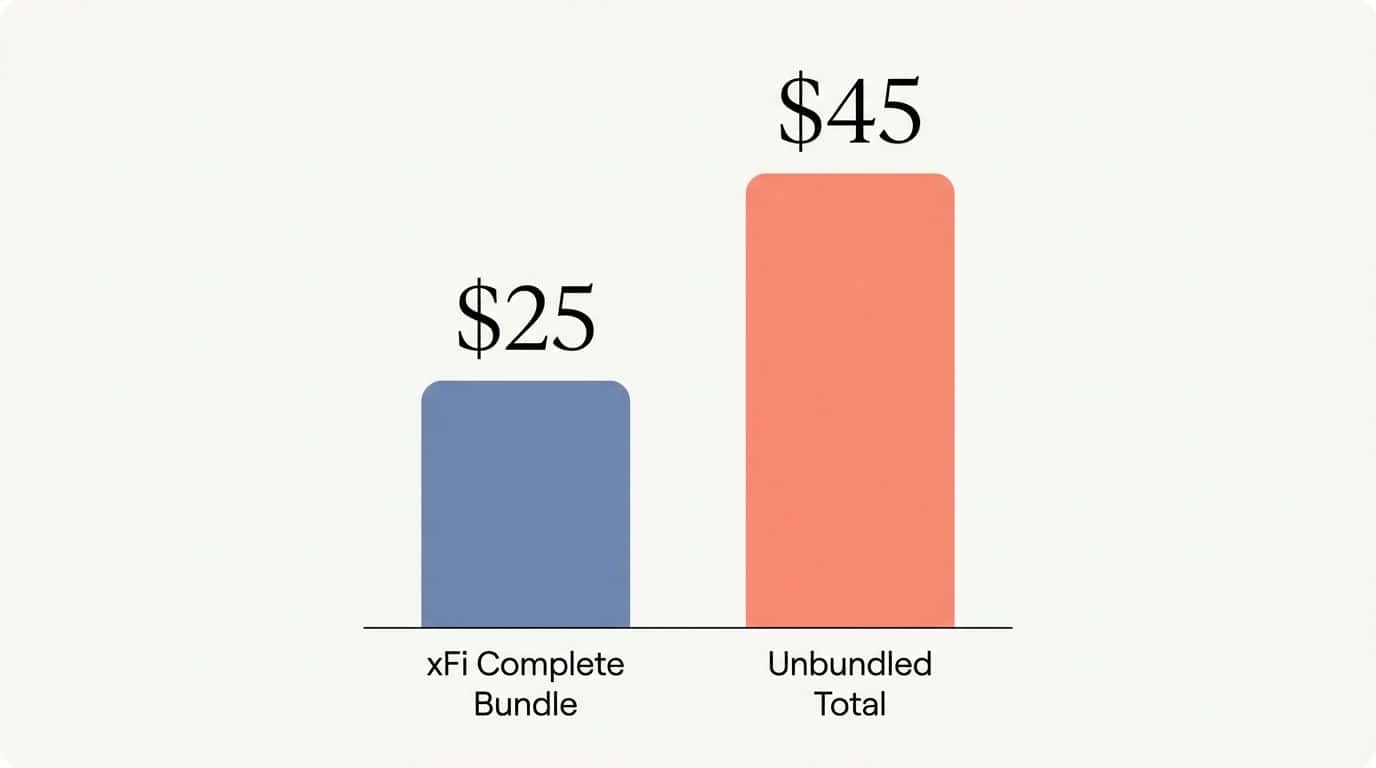
| Xfinity xFi Complete Bundle | ~$25.00 | Includes Gateway rental ($15 value) + Unlimited Data ($30 value) + Advanced Security. Total value is ~$45, so you save $20/month. |
| Standard Gateway Rental | $15.00 | Just the box. You still have a 1.2 TB data cap and basic security. |
| Unlimited Data (Standalone) | $30.00 | The cost to remove the cap if you use your own modem or don’t have the bundle. |
| Total Cost (Unbundled) | $45.00 | Buying the rental and data separately costs significantly more. |
| Overage Fees | $10 per 50 GB | Without unlimited data, you pay this if you go over 1.2 TB. Capped at $100/month. |
For my family, the math was clear. We easily hit 1.5 TB of data some months. Paying $25 for the bundle saves us money compared to paying overage fees or buying the unlimited pass separately.
Are There Additional Fees to Consider?
The sticker price isn’t the only thing on the bill. Keep these potential costs in mind:
- Taxes and Fees: Local taxes and “regulatory recovery fees” can add $5-$10 to your final bill.
- Installation: If you need a pro to come out, it usually costs around $100. Self-install kits are often free or much cheaper ($15 shipping).
- Activation Fee: Some regions charge a one-time activation fee for the internet service itself.
- Unreturned Equipment: If you cancel, you must return the Gateway and Pods. Xfinity charges hefty fees (often $150+) for unreturned gear.
- Price Hikes: Promotional pricing often expires after 12 or 24 months. Check your contract terms to see if the base internet price will jump.
XFi Complete vs Standard XFi Gateway
Is the upgrade worth the extra $10-$15 a month over the standard rental? Let’s compare them directly.
How Do the Features Compare?
If you are deciding between just renting the box or getting the “Complete” package, here is the real-world difference.
| Feature | xFi Complete Bundle | Standard Gateway Rental |
|---|---|---|
| Price | ~$25/month | $15/month |
| Data Limit | Unlimited | 1.2 TB / month |
| Hardware Upgrade | Free upgrade every 3 years (upon request) | Upgrade only if broken |
| Dead Spot Fix | Free xFi Pods if coverage test fails | Must buy Pods (~$119 each) |
| Mobile Security | Included (Protection on the go) | Not included |
I used to have just the standard rental. Once we started hitting the data cap, upgrading was the obvious choice. The unlimited data alone pays for the difference.
What Are the Benefits of Upgrading?
Upgrading gave me total peace of mind. I stopped policing my kids’ download habits because the data meter was gone. The network is safer thanks to the advanced parental controls and threat blocking.
Plus, qualifying for the free xFi Pods (if your home needs them) is a huge perk. Buying a mesh system separately can cost hundreds of dollars. With xFi Complete, Xfinity essentially guarantees coverage for the monthly fee.
However, since January 2025, remember that you must request your hardware upgrade after three years. It is no longer automatic, so set a reminder in your calendar!
How Will XFi Complete Change in 2025?
The landscape is shifting. As of late 2025, Xfinity is moving toward simpler, all-inclusive plans in many markets to compete with fiber providers.
In these new “Plus” or “All-In” plans, unlimited data and the Gateway rental are often included in the base price of the internet service. This makes the separate “xFi Complete” add-on unnecessary for new customers in those areas.
If you are an existing customer, you generally keep your current plan and benefits. But if you move or change your speed tier, you might be migrated to one of these newer structures. It is actually a good thing—it often means getting the same benefits without the confusing add-on fee.
Always keep your email address updated in the Xfinity app. That is how they notify you of these plan changes and eligibility for new equipment like the Storm-Ready WiFi device, which keeps you online even during power outages.
People Also Ask
What is Xfinity XFi Complete, and how does it work?
I think of XFi Complete as a $25-per-month bundle that combines unlimited data with the powerful XB8 Gateway rental. It uses smart mesh technology to blanket your home in fast Wi-Fi while saving you from worrying about expensive monthly data overage fees.
Does Xfinity XFi Complete help with dead zones in my house?
Yes, it actually comes with a 14-day Whole Home WiFi evaluation that automatically tests your signal strength after setup. If the system detects any weak spots during that time, they will send you a free xFi Pod extender to fix the coverage.
Is there any extra security included with Xfinity XFi Complete?
Definitely; the built-in Advanced Security automatically blocks risky websites and phishing attacks on all your connected devices, giving you constant protection without installing extra software.
Can I control my family’s internet use with Xfinity XFi Complete?
You absolutely can manage everything directly from the Xfinity app on your phone. I personally use the “Downtime” feature to pause Wi-Fi during family dinners, and the “Active Time Limits” help ensure the kids aren’t scrolling when they should be sleeping.
References
https://icon-era.com/blog/what-is-xfi-complete-a-review-of-xfinitys-all-in-one-internet-solution.391/ (2025-10-24)
https://www.xfinity.com/support/articles/xfi-advantage-faqs
https://www.xfinity.com/support/articles/whole-home-wifi-evaluation
https://www.xfinity.com/support/articles/exp-unlimited-data
https://www.xfinity.com/learn/internet-service/modems-and-routers
https://www.xfinity.com/support/articles/broadband-gateways-userguides
https://skampakis.com/how-does-xfi-complete-work-your-essential-guide/ (2025-10-21)
https://www.xfinity.com/support/articles/xfinity-xfi-overview
https://www.xfinity.com/support/articles/personalize-customize-hnetwork-xfi
https://coruzant.com/wireless/xfi-complete/ (2025-03-28)
https://www.topinternetplans.com/blog/xfi-gateway-vs-xfi-complete/ (2025-08-29)